
Duospin Registration
Duospin registration creates your account on duospincasino.eu in 2 to 3 minutes. We allow one account per person, with details that belong to you. Start with a working email address or phone number, then complete our sign-up form. Keep access to that contact method so you can receive confirmation and finish setting up your profile.
Before Duospin Registration
Prepare for Duospin registration by checking that you meet our minimum age of 18. Use a device with internet access and keep a working email address or phone available. Enter genuine personal details that match your documents. An existing membership means you should sign in rather than create another profile. Choose contact details you control, not someone else’s inbox or handset.
Duospin registration gives you access to games, deposits, withdrawals and support. Decide how much money belongs within an entertainment budget before starting. Keep essential expenses separate from spending on play. Choosing a comfortable limit beforehand gives each session a clear boundary.
For a straightforward Duospin registration, prepare those decisions before opening our form. There is no need to rush through choices that affect later use. Gambling belongs within planned leisure spending, not financial commitments.
How to Complete Duospin Registration
Begin Duospin registration directly through our official address. Work through each field carefully, checking spelling before continuing. Keep the selected email inbox or phone nearby for confirmation. Read our terms before accepting them, and make deliberate choices wherever our form asks for a preference.
- Type duospincasino.eu yourself into your browser’s address bar.
- Press the registration control to open our sign-up form.
- Enter an email address or phone number and create a password.
- Choose USD as currency and select the applicable country.
- Confirm that you meet our age requirement and accept our terms.
- Enter the confirmation code or follow the link we send, then sign in.
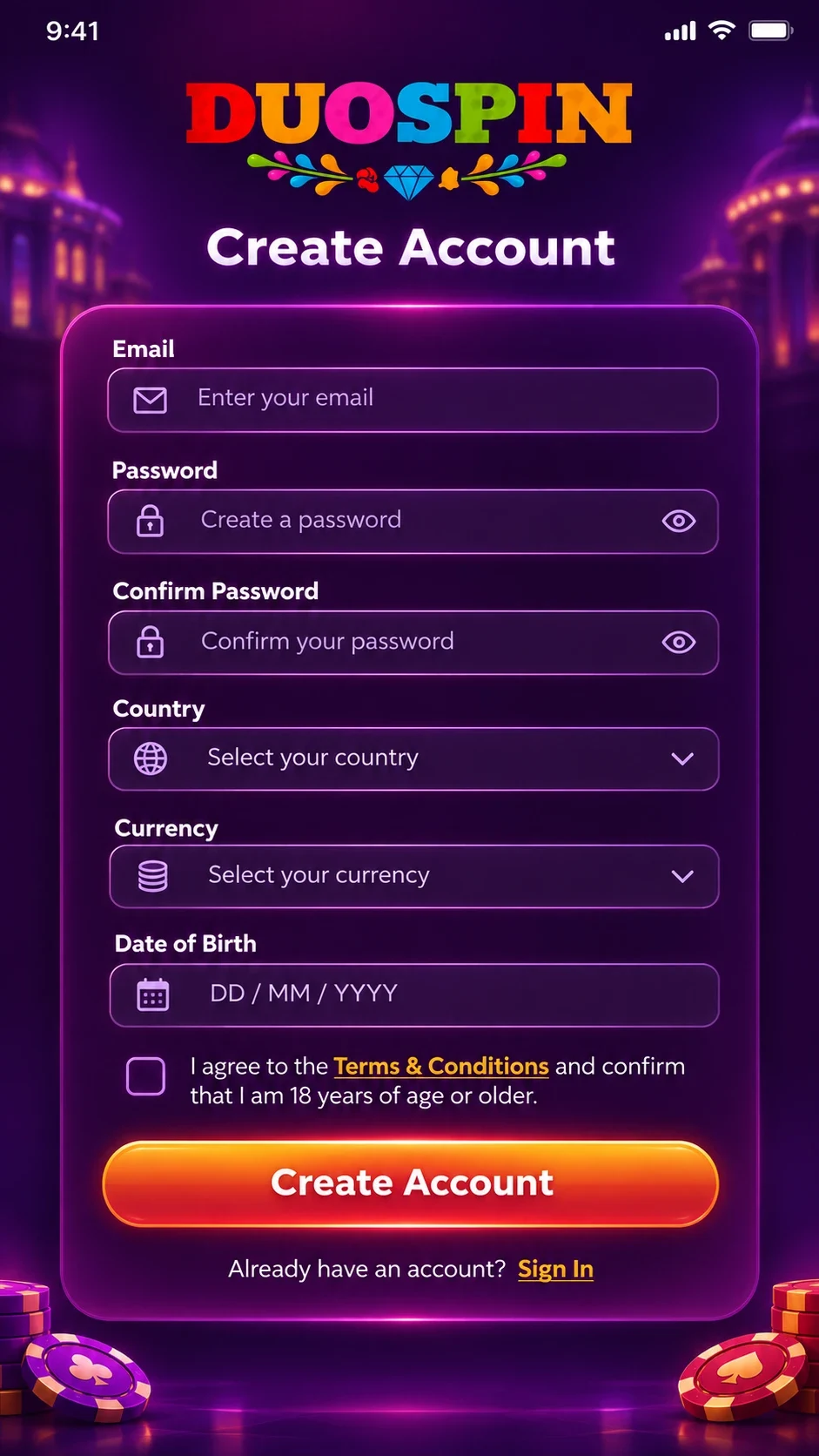
Before completing Duospin registration, check that your browser still shows duospincasino.eu. Fake copies exist, so compare spelling rather than trusting a familiar appearance. Stop if an address differs. Entering our domain directly keeps this check simple and avoids relying on an unfamiliar link when submitting personal information.
Data You Provide
We collect contact and access details during sign-up, then ask for personal information during identity checks. Keep entries consistent across both stages. Our table separates what belongs in each step, including confirmation requirements and document freshness. Currency selection is permanent after sign-up, so review that choice before submitting.
| Data | When We Ask | Requirement |
|---|---|---|
| Email or phone | Sign-up | 6-digit code, valid for 15 minutes |
| Password | Sign-up | At least 8 characters, including 1 letter and 1 number |
| Currency | Sign-up | 1 currency per account |
| Country | Sign-up | 1 country per account |
| Name and date of birth | Verification | Real details; minimum age requirement met |
| Address | Verification | Proof not older than 3 months |
Differences between submitted details and supporting records need correction before identity checks can finish. Compare names, birth information and address details carefully before sending anything. Accurate entries help us connect supporting evidence with the person using our service. Contact support for help resolving a mismatch rather than creating a replacement profile.
Duospin Registration Verification
Duospin registration establishes access, while identity verification confirms who uses that access. We compare personal information with supporting records so the profile belongs to its stated holder. This is a separate stage from confirming an inbox or phone. Prepare clear evidence rather than treating contact confirmation as completed identity approval.
Provide a valid, unexpired photo ID and proof of address. A passport, ID card or driving licence serves as identification; a utility bill or bank statement provides address evidence. After Duospin registration, prepare photographs with readable text, visible edges and no glare. Blurred images make details difficult to assess. Check each picture before submission, keeping important information unobstructed.
Verification is required once, before the first withdrawal. We review submissions within a few hours to 3 business days. Completing Duospin registration does not replace this check, so leave time for review before expecting a payout. Wait for our assessment rather than submitting different personal details in an attempt to bypass it.
Steps After Registration
After Duospin registration, take a moment to organise how you want to play. Start with profile accuracy, then consider spending and game choices. Completing setup is not a reason to rush into a session. A measured start keeps practical decisions separate from excitement about exploring available titles.
- Review personal details. Sign in and inspect saved information. Correct errors before proceeding with other activities.
- Consider our welcome package. Once you have completed all the steps, you can take our welcome bonus: Casino Welcome Package, up to $3,300 + 400 Free Spins across the first four deposits. Full conditions are in the bonus section of duospincasino.eu.
- Plan an affordable first deposit. Choose an amount within the budget already set aside. Leave essential spending untouched.
- Explore a few games. Read their rules before playing. Start with a small selection rather than rushing through unfamiliar titles.
- Set personal boundaries. Decide time and money limits before beginning. Visit our responsible gaming page for further information.
Keep those boundaries in place after Duospin registration, including during later visits. End a session when a chosen limit is reached rather than extending it to recover losses. Gambling is entertainment, never income.
Duospin Registration Security
Protect access from the moment Duospin registration is complete. Treat login credentials and confirmation messages as private information, even when another person offers assistance. Shared devices deserve particular care because someone else uses them afterwards. Simple, consistent habits keep personal access separate from everyday browsing and conversations.
- Choose a strong, unique password.
- Never share confirmation codes with anyone.
- Sign out after using shared devices.
- Type duospincasino.eu yourself when returning.
- Keep contact details current.
We never ask for your password by message. Treat any request for it as a reason to stop the conversation. Avoid copying credentials into replies or sending them alongside screenshots. Assistance should focus on what happened, not on revealing information that gives another person access.
Troubleshooting Duospin Registration
A problem during Duospin registration can involve a typing error, an undelivered confirmation, a weak password, an incorrect country or currency selection, failure to meet our age requirement, or an existing membership. Identify which stage stopped before trying again. Compare entered contact details with their intended spelling. Check incoming messages for the confirmation we sent. An existing profile needs access recovery rather than another sign-up attempt. Keep any error text visible while deciding what needs attention.
First, review incomplete fields and follow the stated requirements. Correct mistakes before submitting again, remembering that currency cannot be changed after creation. If assistance is needed, write to support@duospincasino.eu with the step reached, what appeared onscreen, plus device and browser details. Describe the issue clearly so we can focus on the interruption. Include relevant error wording without exposing private credentials. Never send a password, and leave confirmation codes out of correspondence.
Last updated: